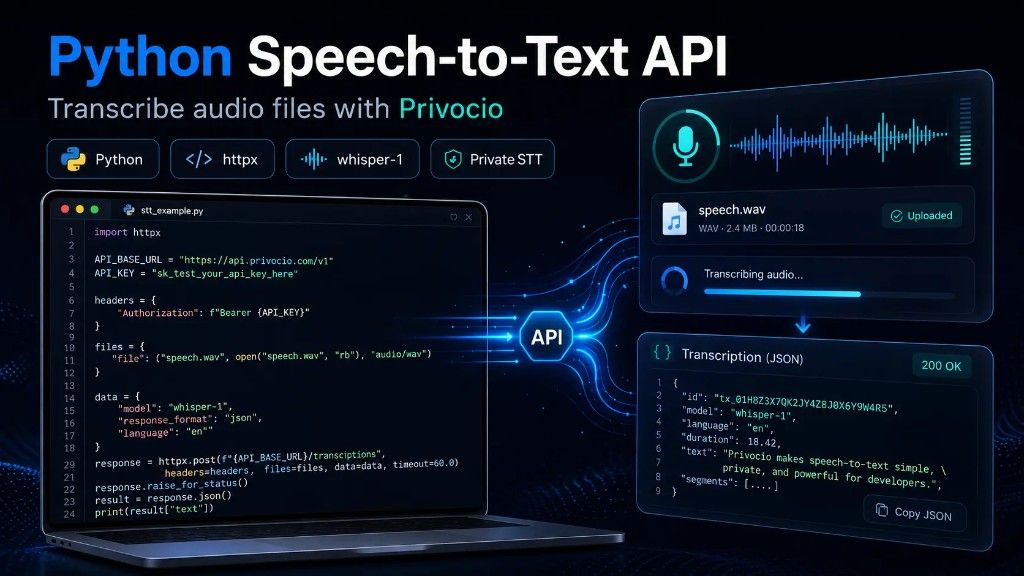
.wav file, pass model=whisper-1, set the language, and receive the transcript as JSON.
If you are building an AI agent, chatbot, meeting tool, voice note app, internal automation, or any product that needs voice input, you eventually need a reliable way to turn audio into text.
In this guide, you will learn how to use a Python Speech-to-Text API with Privocio. We will upload an audio file, send it to the transcription endpoint, authenticate with an API key, and print the transcript response.
Privocio is built for teams that need private speech-to-text infrastructure with hosted or self-hosted deployment, predictable pricing, and output modes designed for downstream AI workflows.
| Use case | Language | API style | |
|---|---|---|---|
| Audio file transcription | Python | HTTP + OpenAI-compatible |
What is a Python Speech-to-Text API?
A Python Speech-to-Text API lets your application send an audio file to a transcription service and receive text back.
Instead of running speech recognition models locally, your Python app can make a simple HTTP request with:
- an audio file
- an API key
- a model name
- optional language settings
- optional output preferences
This is useful for AI agents, voice chatbots, meeting transcription, support call analysis, internal voice notes, legal or healthcare transcription, and workflow automation.
Why use Privocio for speech-to-text in Python?
Privocio is designed for developers and teams that care about cost, privacy, and AI-ready output.
Simple API integration
Privocio exposes a versioned HTTP API and uses Bearer authentication. The production API base is:
https://api.privocio.com
Transcription requests can be sent to:
/v1/transcriptions
See the full API documentation and Python examples for request details.
Privocio also supports an OpenAI-compatible transcription route for developers who already use Whisper-style transcription workflows.
OpenAI Whisper-compatible workflow
If you already know the Whisper-style API flow, Privocio feels familiar. You send a multipart file upload, pass a model such as whisper-1, and receive a transcription response.
This makes Privocio a practical Whisper API Python alternative for teams that want a familiar developer experience with more control over voice infrastructure.
Private hosted or self-hosted deployment
For teams working with sensitive voice data, Privocio can be used as hosted infrastructure or deployed in a self-hosted setup. Learn more on the pricing page.
This matters for companies that do not want audio data moving through third-party systems they do not control.
Output modes for AI workflows
Privocio supports output modes designed for different use cases.
- Use Raw mode when you need maximum fidelity.
- Use Clean mode when you want a more readable transcript.
- Use Agent mode when the transcript will be passed into an AI agent, workflow automation, or LLM pipeline.
Predictable pricing
Many speech-to-text APIs charge per minute or per hour, which can become unpredictable as usage grows.
Privocio is built around predictable pricing and flat-rate usage packages, making it easier to plan costs for AI agents, automation products, internal tools, and high-volume transcription workflows.
Prerequisites
Before you start, you need:
- Python 3.9 or newer
- an audio file, for example
recording.wav - a Privocio API key (authentication docs)
- the
httpxpackage
Install httpx:
pip install httpx
Python Speech-to-Text API example with httpx
Here is a simple Python example that uploads an audio file to Privocio and prints the transcription response.
import httpx

API_BASE = "https://api.privocio.com"
API_KEY = "YOUR_API_KEY"

with open("recording.wav", "rb") as audio_file:
    files = {"file": ("recording.wav", audio_file, "audio/wav")}
    data = {"model": "whisper-1", "language": "en"}

    response = httpx.post(
        f"{API_BASE}/v1/transcriptions",
        headers={"Authorization": f"Bearer {API_KEY}"},
        files=files,
        data=data,
        timeout=600.0,
    )

    response.raise_for_status()
    print(response.json())
How the Python example works
1. Import httpx
import httpx
httpx is used to send the HTTP request from Python to the Privocio API.
2. Set the API base and API key
API_BASE = "https://api.privocio.com"
API_KEY = "YOUR_API_KEY"
The API base points to Privocio's production API. The API key is used in the Authorization header.
In production, do not hardcode your API key. Use an environment variable instead.
import os

API_KEY = os.environ["PRIVOCIO_API_KEY"]
3. Open the audio file
with open("recording.wav", "rb") as audio_file:
The file is opened in binary mode so it can be uploaded as multipart form data.
4. Prepare the file upload
files = {"file": ("recording.wav", audio_file, "audio/wav")}
This tells the API which file you are uploading and what MIME type it uses.
5. Set the transcription parameters
data = {"model": "whisper-1", "language": "en"}
The model parameter defines the transcription model. The language parameter helps the transcription system understand the expected spoken language.
6. Send the request
response = httpx.post(
    f"{API_BASE}/v1/transcriptions",
    headers={"Authorization": f"Bearer {API_KEY}"},
    files=files,
    data=data,
    timeout=600.0,
)
This sends the audio file to the transcription endpoint documented in the API reference.
The long timeout is useful for larger audio files, because batch transcription waits until the full result is ready.
7. Handle errors and print the result
response.raise_for_status()
print(response.json())
raise_for_status() raises an exception if the API returns an error status code. If the request succeeds, the response JSON contains the transcription result.
Better production example: use environment variables
For real applications, keep your API key outside your source code.
import os
import httpx

API_BASE = "https://api.privocio.com"
API_KEY = os.environ["PRIVOCIO_API_KEY"]

def transcribe_audio(path: str, language: str = "en") -> dict:
    with open(path, "rb") as audio_file:
        files = {"file": (path, audio_file, "audio/wav")}
        data = {
            "model": "whisper-1",
            "language": language,
        }

        response = httpx.post(
            f"{API_BASE}/v1/transcriptions",
            headers={"Authorization": f"Bearer {API_KEY}"},
            files=files,
            data=data,
            timeout=600.0,
        )

        response.raise_for_status()
        return response.json()

if __name__ == "__main__":
    transcript = transcribe_audio("recording.wav")
    print(transcript)
This version is better for real applications because the API key is loaded from an environment variable instead of being written directly into the source code.
OpenAI-compatible Python option
Privocio also supports an OpenAI-compatible transcription route. This is useful if you already use OpenAI-style transcription code and want a familiar setup.
from openai import OpenAI

client = OpenAI(
    api_key="YOUR_API_KEY",
    base_url="https://api.privocio.com/v1",
)

with open("recording.wav", "rb") as audio_file:
    transcript = client.audio.transcriptions.create(
        model="whisper-1",
        file=audio_file,
        language="en",
    )

print(transcript.text)
Use this approach when you want to keep your existing OpenAI SDK structure while routing transcription through Privocio.
If you prefer JavaScript or TypeScript, see the JavaScript STT API examples.
When should you use batch transcription?
Batch transcription is best when you already have a complete audio file.
Use it for uploaded voice notes, recorded calls, podcasts, meetings, interviews, support recordings, and internal audio archives.
For real-time voice agents or live transcription, streaming transcription may be a better fit.
Batch transcription vs. streaming transcription
Use batch transcription when the full audio file already exists.
Use streaming transcription when you need live or near-real-time transcription.
A simple rule:
- Use batch transcription for files.
- Use streaming transcription for live voice.
For example, a meeting recording can use batch transcription. A real-time AI voice agent should usually use streaming transcription.
Common errors and how to fix them
401 Unauthorized
This usually means the API key is missing, invalid, or not passed correctly.
Check that your request includes:
Authorization: Bearer YOUR_API_KEY
Also check that the key has not expired and that it has access to the transcription endpoint. See authentication and API keys.
413 Payload Too Large
Your audio file may be larger than your current plan allows.
To fix this:
- compress the audio file
- shorten the recording
- split the file into smaller parts
- check your current usage limits
415 Unsupported Media Type
This usually means the uploaded file type or MIME type is not supported.
Check that your file is a valid audio file and that the MIME type matches the file format.
files = {"file": ("recording.wav", audio_file, "audio/wav")}
502 Runtime Unavailable
The transcription runtime may temporarily be unavailable.
For production applications, add retry logic for temporary errors.
Best practices for Python speech-to-text integrations
Store API keys safely
Use environment variables or a secrets manager. Never commit API keys to GitHub.
Set a realistic timeout
Audio transcription can take longer than a normal API request. For longer files, use a longer timeout.
Validate file type and size before upload
Check the file extension, MIME type, and file size before sending the request.
Add retry logic
For production systems, retry temporary errors such as network failures or runtime availability issues.
Choose the right output mode
Use Raw, Clean, or Agent output modes depending on your downstream workflow.
Python Speech-to-Text API use cases
AI agents
Turn voice commands into structured text that agents can understand and act on. See our guide on speech-to-text for AI agents.
Chatbots
Add voice input to a chatbot so users can speak instead of typing.
Meeting tools
Transcribe meeting recordings and send the text to a summarization pipeline.
Support call analysis
Convert support calls into text so they can be analyzed, summarized, tagged, and routed.
Legal and compliance workflows
Keep sensitive conversations private with hosted or self-hosted transcription infrastructure.
Healthcare and finance applications
Use private transcription infrastructure when audio data is sensitive and strict data handling matters.
Why this matters for AI agents
AI agents work better when they receive enough context.
Typing long instructions is slow. Speaking is faster.
A private speech-to-text API lets users talk to their agents, send longer instructions, explain edge cases, and provide richer context without typing everything manually.
That is one of the main reasons Privocio focuses on voice infrastructure for AI workflows.
Frequently Asked Questions
What is a Python Speech-to-Text API?
A Python Speech-to-Text API lets a Python application upload audio and receive a text transcript. Instead of running a model locally, your app sends the audio file to an API endpoint and gets the transcription result back.
How do I transcribe an audio file in Python?
You can transcribe an audio file in Python by opening the file in binary mode, uploading it as multipart form data to a transcription API, authenticating with an API key, and reading the JSON response.
What is the best Python package for calling a speech-to-text API?
For simple HTTP requests, httpx is a good choice. It supports file uploads, custom headers, timeouts, and clean error handling.
Can I use Privocio as a Whisper API alternative?
Yes. Privocio supports Whisper-style transcription workflows and also provides an OpenAI-compatible transcription route. Compare options in our Privocio vs OpenAI Whisper guide.
Can I transcribe WAV files with Python?
Yes. You can open a WAV file in binary mode and upload it to Privocio using multipart form data.
Should I use batch or streaming transcription?
Use batch transcription for completed audio files. Use streaming transcription when you need real-time or near-real-time transcription.
Is Privocio only for Python developers?
No. Privocio also supports cURL, JavaScript/TypeScript, OpenAI-compatible integrations, and streaming workflows.
Is a private speech-to-text API useful for AI agents?
Yes. A private speech-to-text API is useful for AI agents because it lets users speak longer, more detailed instructions while keeping voice data under better control.
Conclusion: Start With One File Upload
A Python Speech-to-Text API is one of the fastest ways to add voice input to your application.
With Privocio, you can upload an audio file, authenticate with a Bearer token, and receive a transcription response using a simple Python httpx request.
For teams building AI agents, internal tools, voice workflows, or privacy-sensitive products, Privocio adds important advantages: private deployment options, predictable pricing, Whisper-compatible API patterns, and output modes designed for downstream AI workflows.
Start with the simple Python example above, then move toward environment variables, error handling, retries, and the right output mode for your application.
Start building with Privocio
Add private, reliable speech-to-text to your Python app, AI agent, chatbot, or internal workflow.